How to generate a directory tree from a GitHub URL without cloning
If someone asks “where does this library turn files into a text tree?”, the whole repository is more than they need. Open the source folder on GitHub, copy its URL, and import that folder into dir-tree. You can give them a short, annotated map in Markdown without checking out the repository.
Choose the URL that sets the root
Copy either link below to try the public devmc12/dir-tree repository. On a phone, press and hold the link to copy its address. No Token is needed.
| GitHub link | What gets imported |
|---|---|
| Repository root | The whole project on its default branch, including docs/, playground/, and src/. |
| src/ folder | Just src/ on main, including adapters/, ascii/, and parser/. |
For your own repository, select the branch on GitHub and open the folder before copying the address. Copy the address of the folder view, not the /blob/… link to a file inside it.
Using GitLab instead? Use the same Repo tab:
- Whole project: Copy the project URL, such as
https://gitlab.com/group/project. If the project belongs to a subgroup, keep that part of the path. - One folder: GitLab uses
/-/tree/where GitHub uses/tree/. For example,https://gitlab.com/group/subgroup/project/-/tree/main/srcselects thesrcfolder onmain. A/-/blob/link points to a file and won't import.
The importer supports GitLab.com, not self-managed GitLab hosts.
Import the folder and check the result
- Open the generator. In the control panel, choose Import → Online Repo / ZIP → Repo.
- Paste the src/ folder link into Repository URL. Check that Ref says
mainand Subpath sayssrc. You don't need to fetch the branch list for this link. - Leave Token (optional) empty and select Import repository. In Directory tree, look for
srcat the root andadaptersbeneath it. If you seedocsandplaygroundbesidesrc, you've imported the repository root instead.
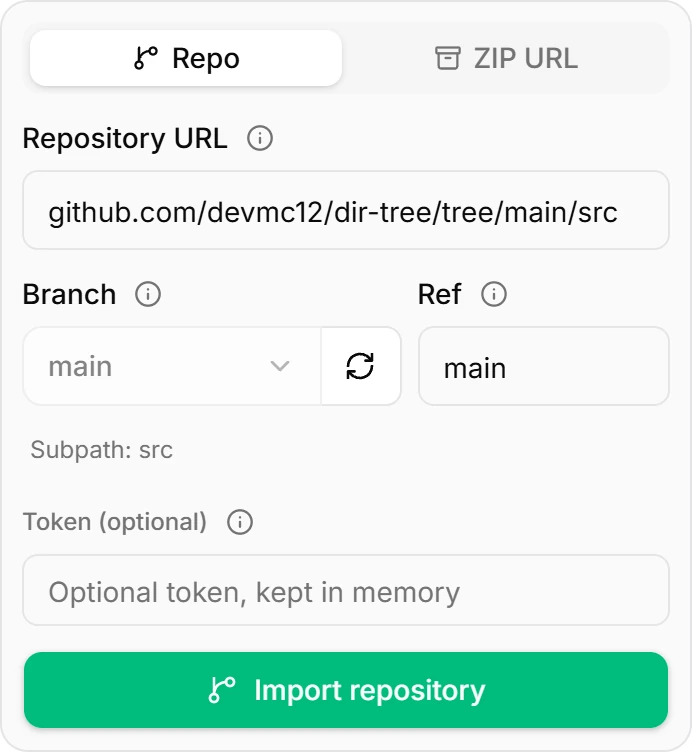
Want a different revision? If a repository uses a default branch other than main, don't assume the suggested Ref is correct. Use Fetch branches to choose the branch, or enter a known tag or commit SHA in Ref. A branch can change; a commit SHA is useful when documenting the structure of a specific release.
Turn the source tree into a README excerpt
Suppose the reader wants to know where input is read, where pasted trees are parsed, and where text output is rendered. Keep the three relevant directories and the public entry point; hide the other nodes from this view. For each path you want to explain, choose Add annotation in its node actions. The notes below are editorial choices, not descriptions fetched from GitHub.
Open the download menu beside Text tree and choose Download Markdown. Or copy this fenced excerpt directly into a README:
```text
src/
├── adapters/   # Read trees from folders, repositories, and ZIPs
├── ascii/      # Render a tree as text
├── parser/     # Turn existing tree text back into nodes
└── index.ts    # Public library exports
```
Hiding a node here does not remove it from GitHub, and downloading Markdown does not edit the README in the repository. For help choosing depth or aligning longer notes, see How to create a directory tree for a README.
If the import doesn't match what you see on GitHub
- Wrong folder or branch: Compare Ref and Subpath with the folder view you copied. If a branch name itself contains a slash, fetch the branches so the importer can distinguish the branch from the folder path.
- Private repository or rate limit: Being signed in on github.com doesn't sign the importer in. Use Token (optional) for a repository you can read, or retry a public import after the limit resets. The Token stays in memory; don't paste it into the URL or your README.
- Repository too large: Open the directory your reader actually needs and import its folder URL. Reducing the displayed depth makes the output shorter; it isn't a guarantee that the provider can return a complete tree.